Displaying Genius AI CAD on 3D Images
In the following example, which is from the Genius AI CAD, two out of the ten CAD marks for the exam appear on this image. The Case Score indicates the Genius AI's confidence, represented as a percentage, that the overall findings identified are malignant. Depending on the count and type of CAD markings on the image, the number is displayed next to its associated icon in the image overlays.
The following CAD markings are visible on the image:
- The plus (+) icon indicates Mass with calcification.
- The triangle (
 ) icon indicates Calcification Cluster.
 - The asterisk (*) icon indicates breast density.
- The blue line (
 ) on the scrollbar indicates the CAD Marks.
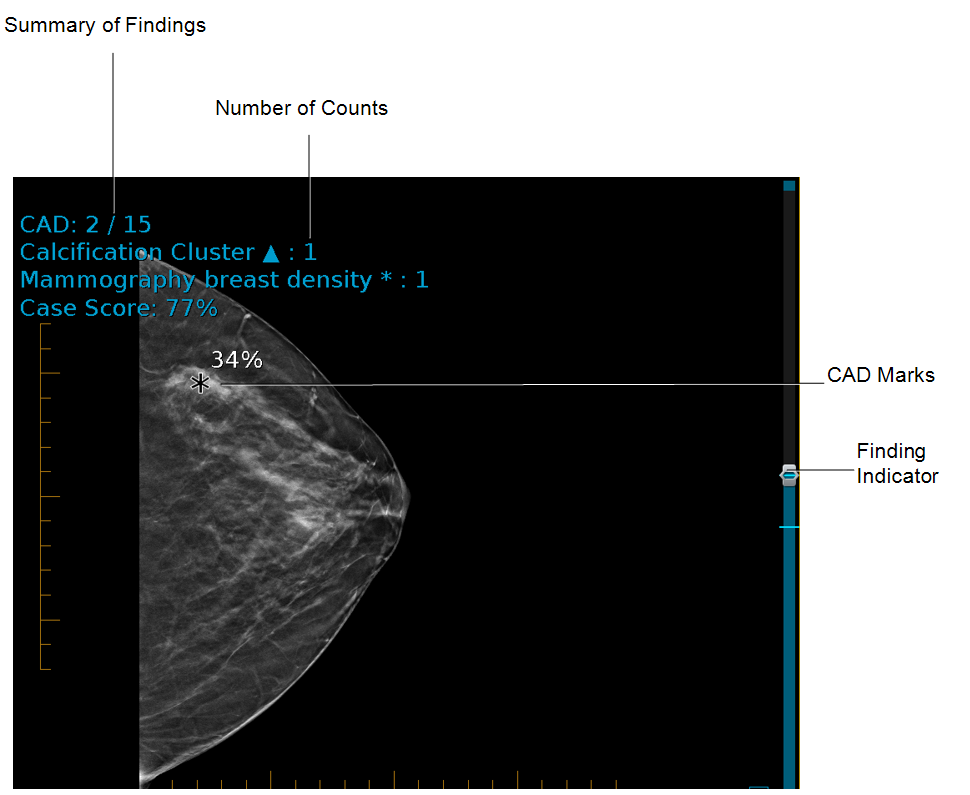
CAD marks appear on images, with the same percentage of confidence of malignancy, indicated on the mark for that specific finding. If there are multiple findings in the series, each finding will have a finding indicator mark in a blue line on the scrolling panel on the right side of the image. You can override the CAD instructions in the layout reading step and show or hide CAD marks manually.