Viewing Repeat Images
Often a study contains two or more images that match a view in a step. These images are repeat images. If repeat images exist for both the current study and the comparable prior study, as you move through the images, InteleViewer automatically displays repeat images for both the current study and comparable prior studies up to the total number of repeat images in the current study.
For example, if the current study contains four repeat images and the comparable prior study contains six repeat images, as you move through the study, InteleViewer displays a maximum of four repeat views automatically for both the current and the comparable prior study.
To view the remainder of the repeat images for the current study or comparable prior study, click the Repeat Image indicator in the Layout View text overlay of the respective study.
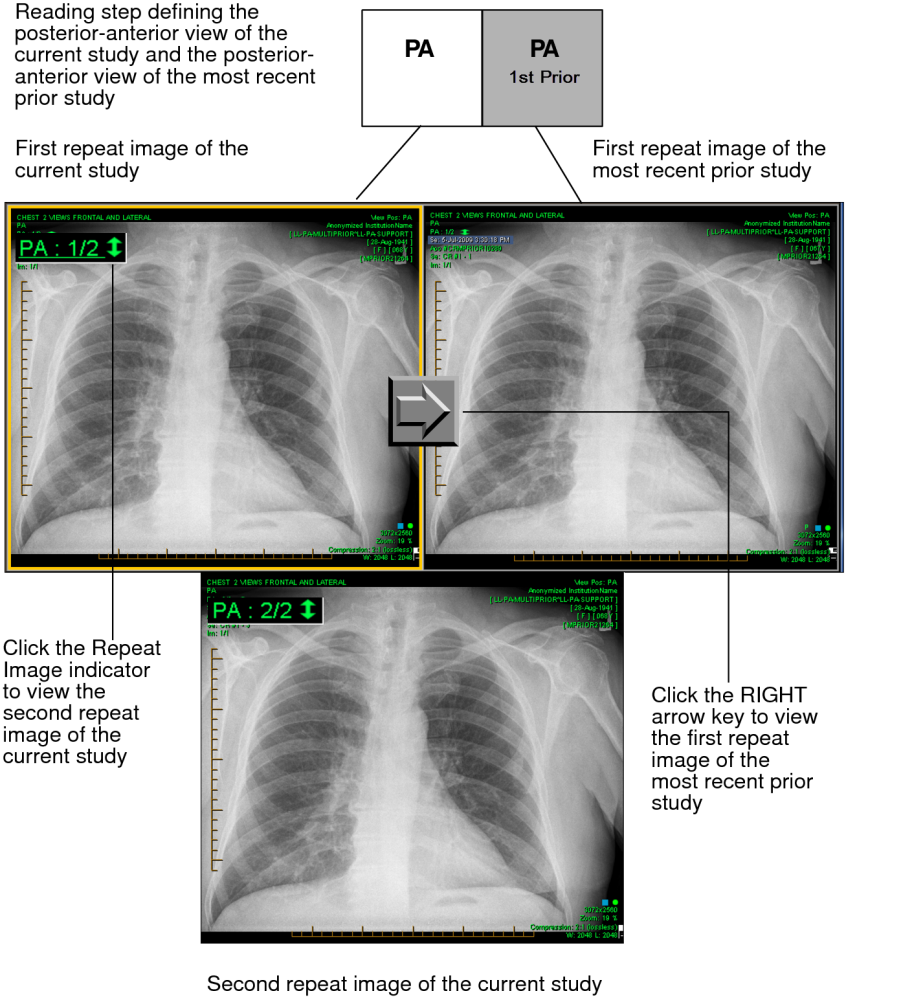
To view repeat images in both the current study and comparable prior study automatically:
-
Press the left or right arrow keys to move through repeat images.
Although the repeat images appear automatically in the viewports, the same reading step remains selected.
To view repeat images for the current study or comparable prior study:
-
Click the Repeat Image indicator in the viewport to view repeat images.
The image number changes to reflect the image you are viewing.