Understanding Prior Studies in Sequence Protocols
You can view and choose prior studies to use in a sequence protocol from the Protocol Preview pane. By default, InteleViewer displays the best-matching prior studies. To display other prior studies, you can use the Comparison list.
A reading step’s view for a prior study is distinguished with a gray background. For mammography studies each prior is numbered.
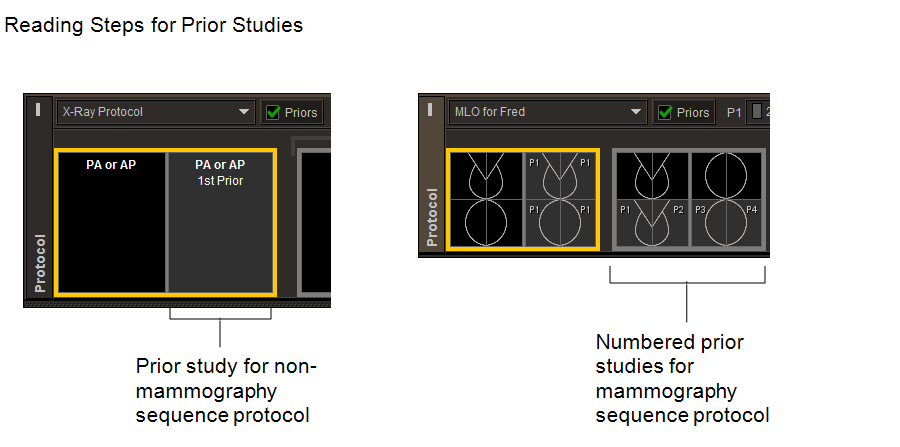
A sequence protocol can contain two lists of reading steps: a list for no prior studies and another list with prior studies. The Priors check box, when enabled, applies the reading steps with prior studies if it is available. When the current sequence protocol matches one or more priors, InteleViewer enables Priors. Priors is disabled when InteleViewer does not find any matching priors.
The Comparison list contains comparable prior studies that you can use as the comparison studies in the sequence protocol. When a sequence protocol uses multiple priors, InteleViewer displays a separate Comparison list for each prior study. The prior study that best matches the matching criteria of the view is automatically selected in the list. Priors studies that match the views in the reading steps are displayed in reverse chronological order in the list, from most recent to oldest.
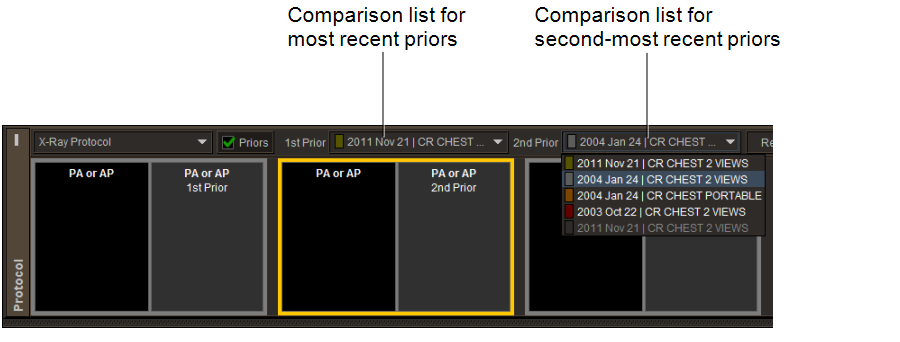
The prior studies in the Comparison list have dedicated color codes to differentiate between prior studies when loaded in the viewports. A study with a black square is more recent than the current study.
If you mark a new prior study as relevant, the colored squares for the comparison priors in the list are automatically updated to indicate their new position in the priors timeline relative to the new study currently loaded in the viewport.
If you mark a comparison prior as nonrelevant, InteleViewer removes it from the list the next time InteleViewer the protocol. You can revert the selected comparison priors to those matched automatically with the Reset button. For example, assume you have a sequence protocol that uses a one-year-old prior and a two-year-old prior. When you open study A, studies B and C are selected as the one-year-old prior and two-year-old prior, respectively. If you then select prior study D instead of prior study B, and prior study E instead of prior study C, and click the Reset button, InteleViewer will revert the sequence protocol to show prior studies B and C.